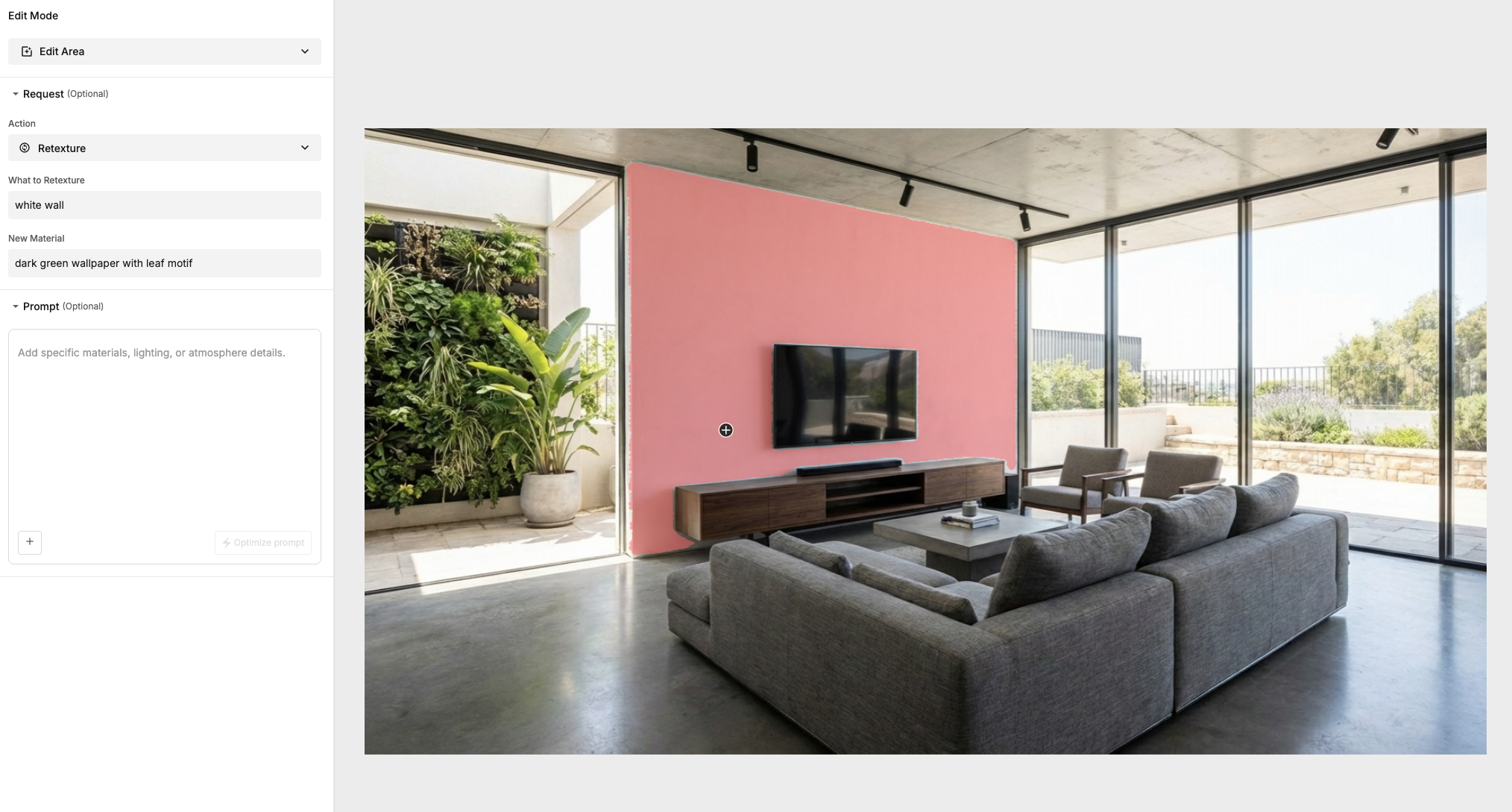
AI Image generation techniques to instantly create contextually aware edits to an image. By evolving the classic "Magic Lasso" into an intelligent, object-aware tool, designers can now retexture surfaces and swap elements with a single click while ArchiX automatically handles complex lighting and shadows.
One of the most compelling byproducts of generative AI for image analysis is a shift toward highly sophisticated, context-aware editing. Ever since Adobe introduced the “Magic Lasso” in Photoshop, there has been interest in how we can select, modify, and update a specific part of an image while keeping the result natural.
For years, the lasso and its descendants served as the gold standard for designers, offering a manual way to carve out space for creativity. The arrival of AI segmentation isn't a rejection of those tools, but rather the next great iterative update in that lineage, moving us from selecting pixels by hand to selecting them by "meaning."
Curious how "meaning-based" selection feels in practice? You can try the Magic Lasso tool for yourself on our demo playground to see how it identifies objects in your own designs.
Previously, auto-segmentation relied almost entirely on separating image parts using clear color delineations. It functioned as a mathematical differentiation between one pixel and its neighbor, determining how to split an image based on color likeness.
For example, if a designer needed to isolate a single wall in a living room to create an accent wall, the software had to determine how the wall's color differed from the floor, the ceiling, and any furniture in the foreground. If the wall color was even slightly similar to other items in the room, the result was often "spillover" and messy artifacts. While an experienced artist could fix these edges manually, it remained a time-consuming process that could easily look artificial in the hands of a novice.
AI image segmentation takes this classic concept and adds a layer of contextual intelligence. Instead of just splitting pixels based on color similarity, ArchiX identifies the objects and makes logical assumptions about what the image represents. By understanding the difference in context rather than just the difference in light waves, the AI allows for a far more natural update.
We have integrated an auto-segmentation tool at ArchiX that leverages this technology, enabling you to simply click an item and describe a change in text.
As you can see in the example below, we segmented a wall with a single click and prompted the ArchiX to apply a textured wallpaper. Even though the initial selection wasn’t "perfect" in a traditional sense, the segmentation correctly identified the back wall's boundaries and recreated the image with its surrounding context intact.
ArchiX didn't just swap the texture; it recreated realistic shadows and lighting around the TV and the buffet, even capturing how light hits the edge of the wall differently. This represents a massive leap forward in workflow efficiency, transforming a complex editing task into a simple interaction between a single click and a few words.

At the heart of this transition is a shift from traditional computer vision to Deep Learning architectures like Transformers and U-Nets. Unlike older tools that analyzed pixel gradients in isolation, these AI models are trained on massive datasets to recognize the "latent space" of an image. When you click a wall, the AI uses a process called Feature Extraction to recognize the geometric boundaries and material properties of that surface. It doesn't just see a flat plane; it perceives depth, occlusion, and light sources.
This neural understanding allows the model to predict how a new texture should interact with existing environmental data, such as ambient occlusion in corners or the soft bounce of light from a window, ensuring the edit is mathematically consistent with the rest of the 3D scene.
Ready to see it in action? If you’d like to experiment with these contextual tools in your own workflow, you can explore the ArchiX Visual Studio. We offer a 14-day trial for new designers to test the limits of AI-assisted editing—no strings attached.